

How Do I List My Fashion Brand on StyleBuddy?

- AI Fashion & Technology
- Fashion Business & Marketing
- Company
How Do I List My Fashion Brand on StyleBuddy?
Quick answer: To list your fashion brand on StyleBuddy, register at brands.stylebuddy.ai, verify your email and log in. Choose StyleBuddy Marketplace, which has zero listing fees, or Agentic StoreFront, then answer a short guided setup: brand basics, socials, catalog profile and catalog sync. With Normal Sync, StyleBuddy reads your products straight from your website.
If you run a fashion brand, getting found is half the battle. Online, a small label competes with thousands of other products for a shopper's attention.
StyleBuddy is built to change that. Shoppers on StyleBuddy discover products through Maya, an AI stylist that suggests outfits by occasion, budget, body type and skin tone. When a shopper picks one of your products, StyleBuddy sends them to your own website to buy it.
This guide walks brand owners through listing on StyleBuddy, from creating an account to syncing your catalog, plus the extra tools you can add, such as virtual try-on.
Step 1: How Do I Create a StyleBuddy Brand Account?
- Go to brands.stylebuddy.ai/register. You can also get there from Add your Fashion Brand in the stylebuddy.in menu, or from the For Brands page.
- Create your account.
- Enter the verification code sent to your email.
- Log in.
- Read and accept the Terms of Use by ticking "I agree to the terms and conditions" and tapping Accept.
You then land on your brand dashboard.
Step 2: Should I Choose Marketplace or Agentic StoreFront?
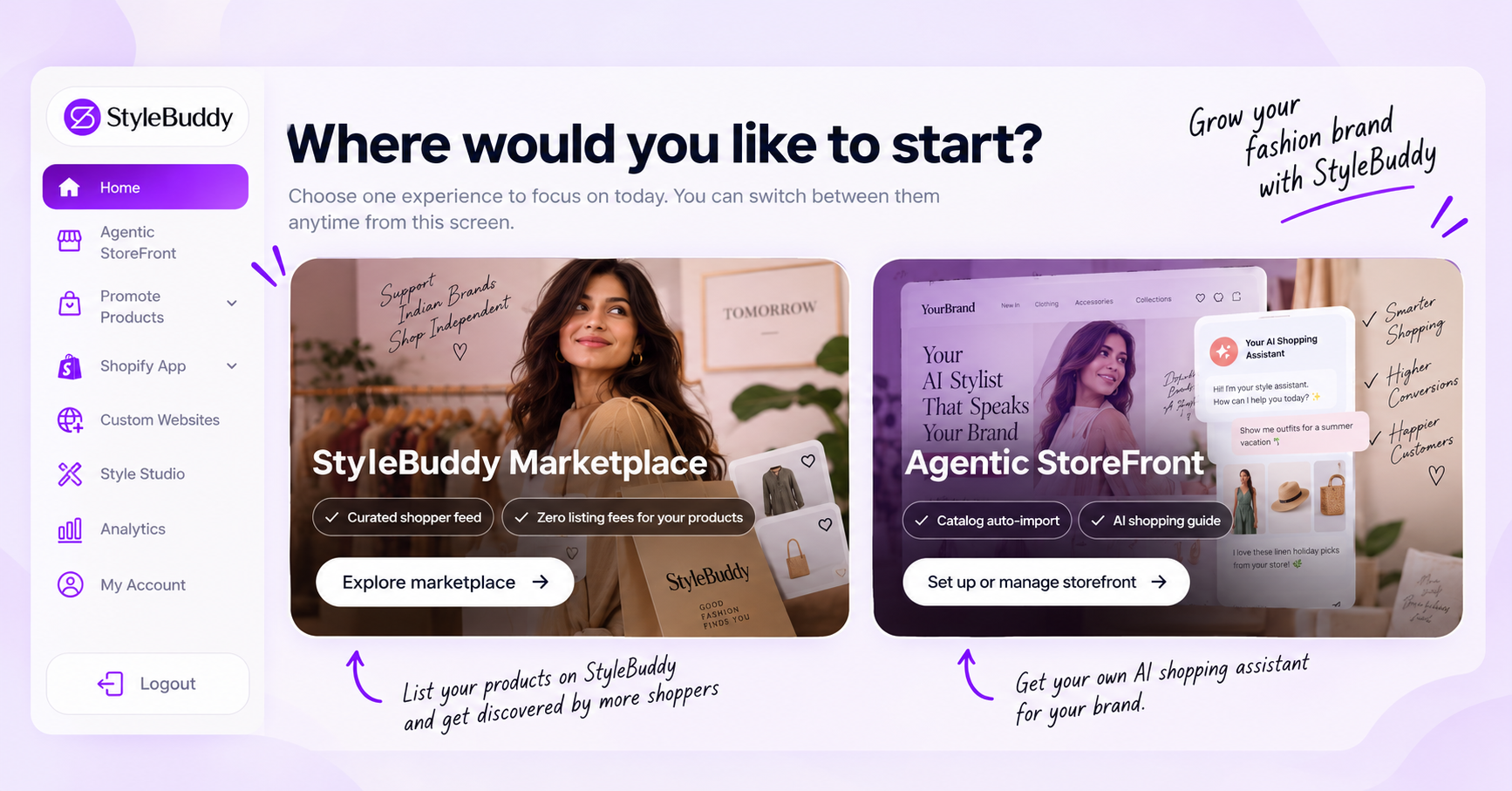
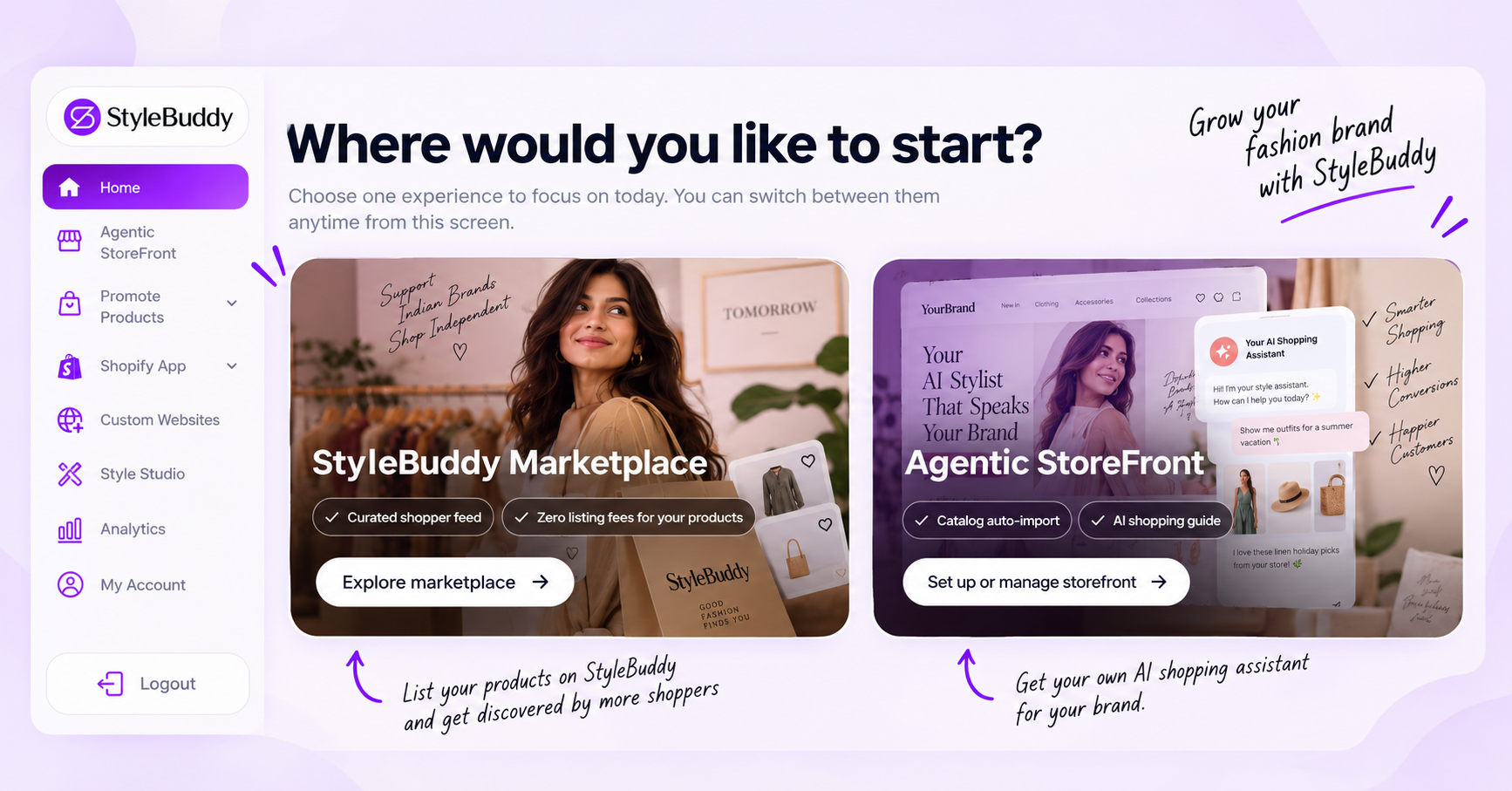
Your dashboard home asks, "Where would you like to start?" You can choose either experience and switch between them at any time from the same screen.
StyleBuddy Marketplace
List your products on StyleBuddy so shoppers can find them through Maya, Shop All, Explore and Shop by Brand. The dashboard highlights a curated shopper feed and zero listing fees for your products. Shoppers who choose your product are sent to your own website to buy. Set it up from Explore marketplace on the home screen, or from Promote Products in the sidebar.
Choose it if: you want more people to discover your brand.
Agentic StoreFront
Get your own AI shopping assistant: a brand stylist that answers shoppers in your brand's name and turns their occasion, mood or budget into looks from your catalog. The dashboard highlights catalog auto-import and an AI shopping guide. Set it up from Set up or manage storefront.
Choose it if: you want an AI stylist for your own brand, with your products only.
You can set up both, one after the other.
Step 3: What Happens in the Guided Setup?
Instead of a long form, a StyleBuddy stylist asks you a few quick questions, one at a time, and sets everything up as you answer. A live storefront preview on the right updates as you go, and Open storefront shows the result. The Agentic StoreFront setup takes about 5 minutes; address and logistics are kept separately in My Account.
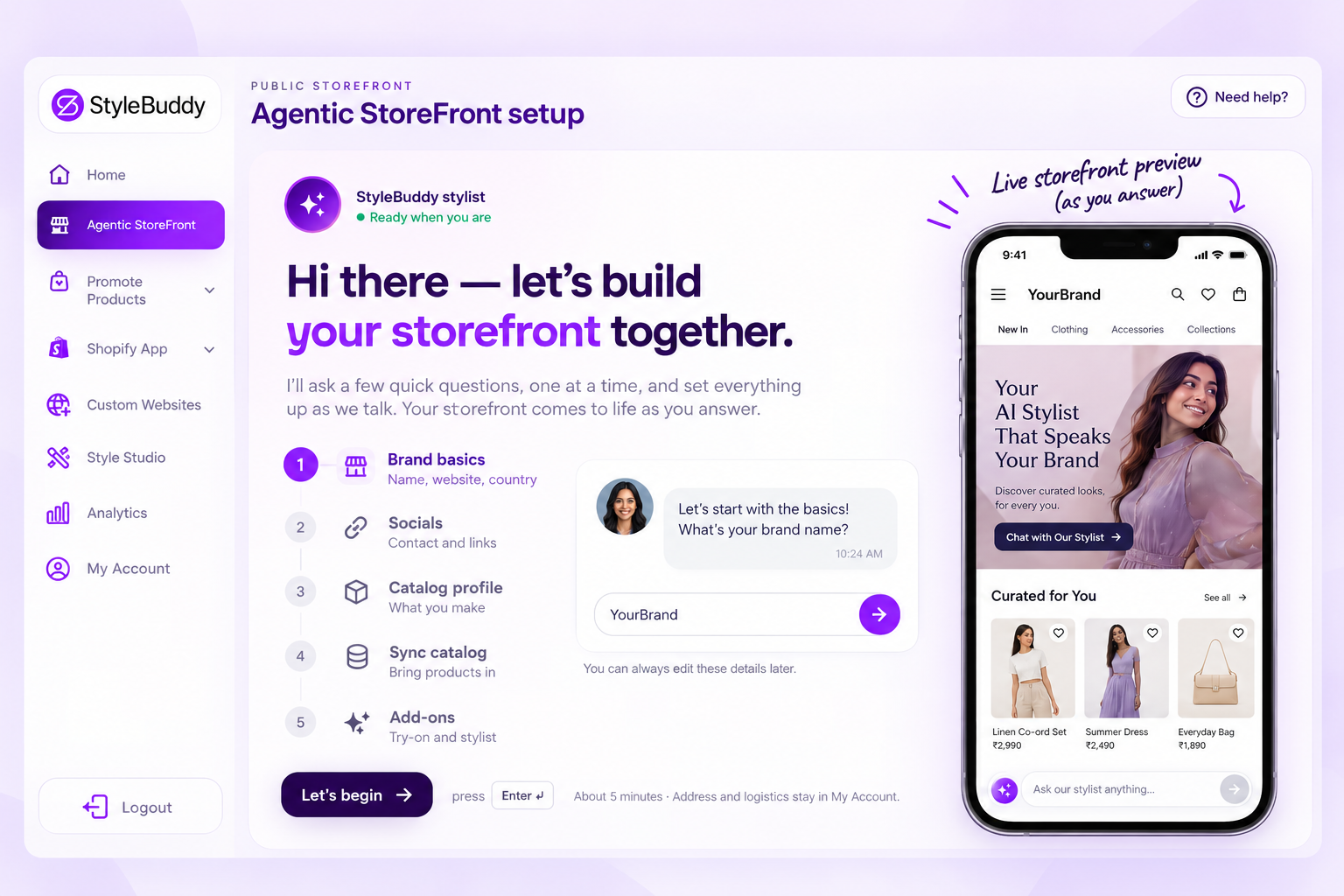
The Agentic StoreFront setup has five stages. The Marketplace (Promote Products) setup follows the same pattern with the first four.
1. Brand basics
- Who you are: Fashion Brand or Manufacturer
- Brand name: the name shoppers will see on your storefront
- Website: your homepage. StyleBuddy reads your catalog from here, and recognises if it's a Shopify store.
- How to bring your catalog in (for Shopify stores; see below)
- Country: where your brand is based, such as India, the United States, the UK, the UAE, Canada or Australia
2. Socials
- Phone number: for StyleBuddy to reach you. It isn't shown publicly by default.
- Social handles: Instagram, Facebook and LinkedIn. A handle is enough, and you can skip this.
3. Catalog profile
Tell StyleBuddy what you make: the kind of products and styles in your catalog.
4. Sync catalog
Bring your products in. If your site runs on Shopify, you choose how:
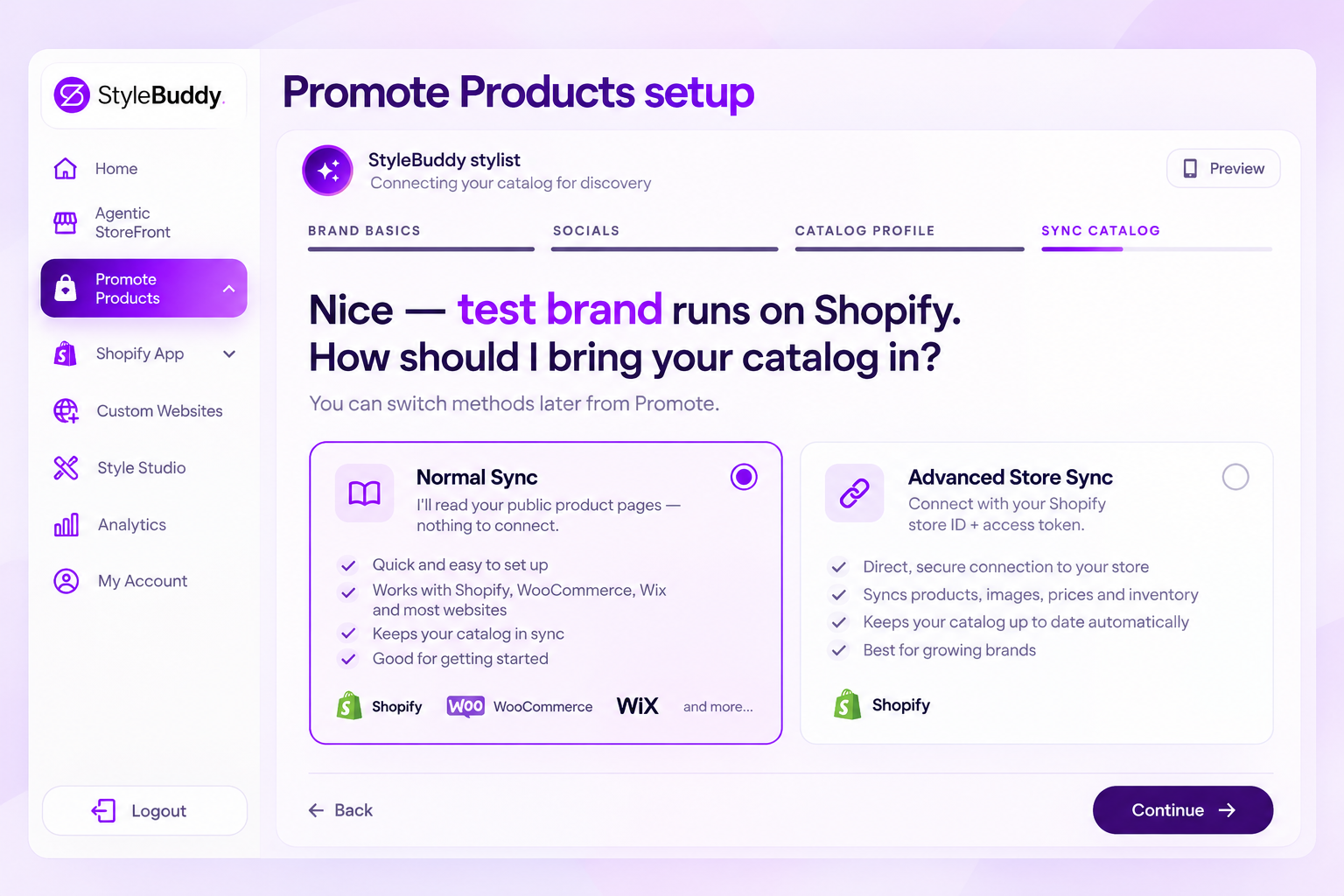
- Normal Sync: StyleBuddy reads your public product pages. There's nothing to connect.
- Advanced Store Sync: connect with your Shopify store ID and an access token.
You can switch methods later from Promote Products.
5. Add-ons (Agentic StoreFront)
Add virtual try-on and the stylist to your storefront. In the preview, shoppers see a Discover tab with prompts such as "Weekend edit", "Wedding guest" and "Under ₹5,000", and a Virtual Try On tab.
What Other Tools Can My Brand Use?
The brand dashboard sidebar has more tools you can add once you're set up.
Virtual try-on for Shopify stores
Under Shopify App > Virtual TryOn, install the StyleBuddy Virtual Try-On & Styling app from the Shopify App Store. Shoppers upload a photo on your product page and see how the clothes look on them, with AI outfit recommendations.
Setup takes four steps: install the app, open the theme editor on a product page, add the Virtual Try On app block near your gallery or buy box, then save and test on a live product.
You can customise the widget's button position, font, colours, logo and photo-guide images, and choose whether to show styling tips. Plans are billed in your Shopify admin, and one credit equals one try-on session:
- Free: 30 credits, $0 a month
- Basic: 200 credits, $14.99 a month
- Pro: 500 credits, $34.99 a month
- Enterprise: 1,000 credits, $68.99 a month
Virtual try-on for other websites
Not on Shopify? Custom Websites adds StyleBuddy virtual try-on to your own storefront with a single script tag. Generate an API key, register your site, paste the integration code and customise the widget. Plans are ₹1,500 a month for 200 try-ons, ₹3,500 for 500 and ₹7,000 for 1,000, with extra try-ons at ₹8 each. Credits reset every billing cycle and don't roll over.
Style Studio
Style Studio is an AI-powered fashion imaging suite. Upload a product image (optional) and describe what you want, such as colour changes or design edits, in General, Fashion Models, Products or Others mode. It runs on coins, and you can save prompts to reuse.
Analytics
Analytics shows how shoppers interact with your products: clicks and views for products promoted on the StyleBuddy website, and stats for your Agentic StoreFront and try-on widget.
Frequently Asked Questions
How do I list my fashion brand on StyleBuddy?
To list your brand on StyleBuddy, register at brands.stylebuddy.ai, verify your email, log in and accept the terms. Choose StyleBuddy Marketplace or Agentic StoreFront, then complete the guided setup: brand basics, socials, catalog profile and catalog sync. The Agentic StoreFront setup takes about five minutes.
Does it cost anything to list products on StyleBuddy?
StyleBuddy Marketplace shows zero listing fees for your products in the brand dashboard. Paid add-ons are separate: the Shopify virtual try-on app starts free with 30 credits, then $14.99 to $68.99 a month, and custom website try-on plans run from ₹1,500 to ₹7,000 a month.
What is the difference between StyleBuddy Marketplace and Agentic StoreFront?
StyleBuddy Marketplace lists your products where StyleBuddy's shoppers browse and chat with Maya, its AI stylist, and sends buyers to your website. Agentic StoreFront gives your brand its own AI shopping assistant that styles shoppers using only your catalog. You can set up both and switch between them anytime.
Do I need to upload my products to StyleBuddy manually?
No, StyleBuddy reads your catalog from your website. Enter your homepage during setup; if you're on Shopify, choose Normal Sync, which reads your public product pages with nothing to connect, or Advanced Store Sync, which uses your Shopify store ID and an access token. You can switch methods later.
Can I add virtual try-on to my website?
Yes, StyleBuddy offers virtual try-on for Shopify stores through its Shopify app, added as a Virtual Try On block on product pages, and for other websites through a single script tag with an API key. Shoppers upload a photo and see the clothes on themselves.
Who pays and ships when a StyleBuddy shopper buys my product?
On StyleBuddy, your brand handles payment and shipping, because StyleBuddy does not sell products itself: when a shopper chooses your product on StyleBuddy, they are sent to your own website to choose a size and pay. Your existing checkout, delivery and return policies apply, so nothing changes in how you fulfil orders.
Get Your Brand on StyleBuddy
Register your brand to get started, or read more on the For Brands page. Have a question first? Use Enquire Now on the For Brands page.
Read next: How Does StyleBuddy Work? · Where Can I Find Streetwear Brands in India? (an example of how brands appear to shoppers)