

How Do I Chat With a Brand's Own AI Stylist on StyleBuddy?

- AI Fashion & Technology
- Company
- General Info
How Do I Chat With a Brand's Own AI Stylist on StyleBuddy?
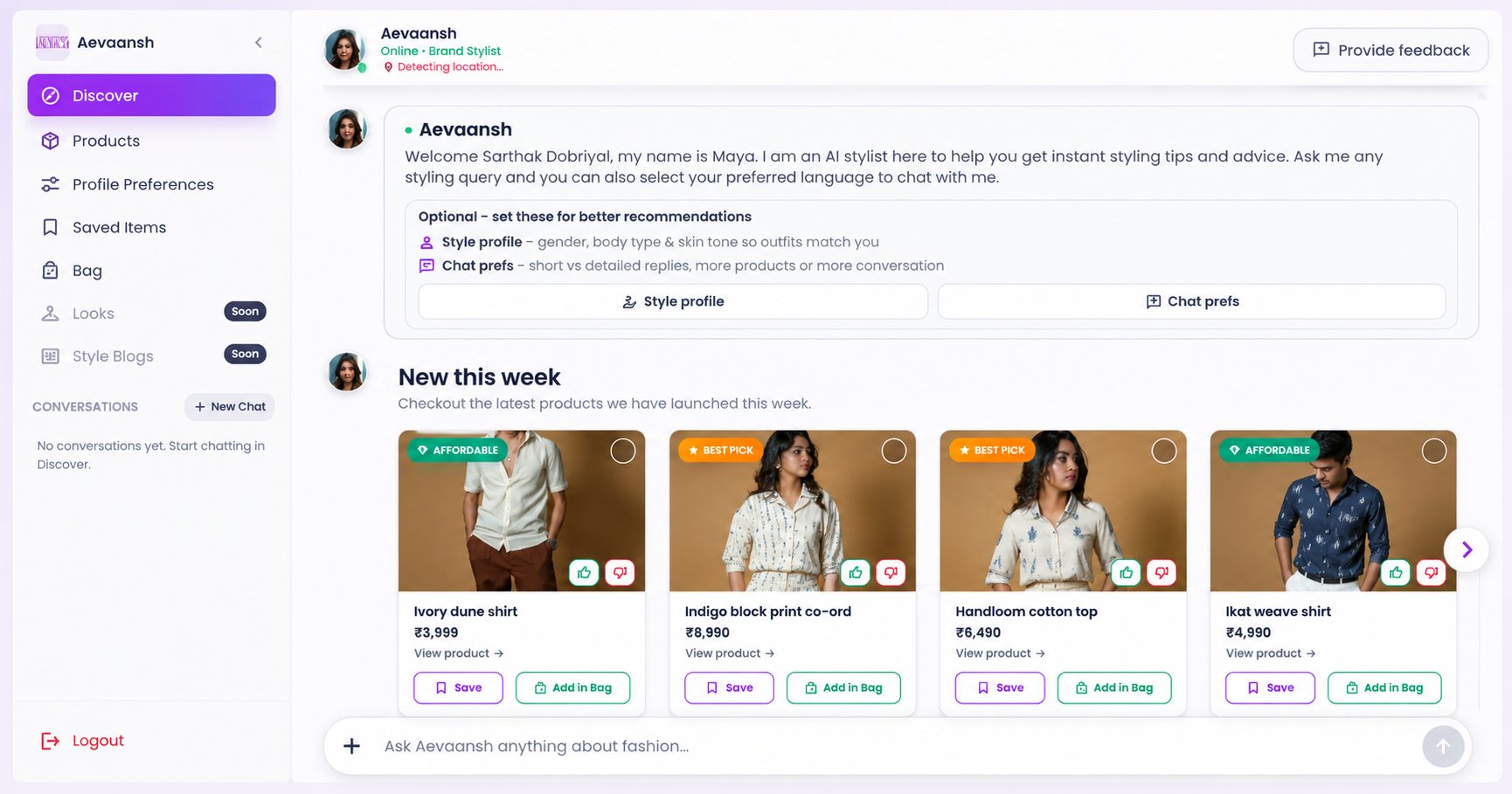
Quick answer: To chat with a brand's own AI stylist on StyleBuddy, open Shop by Brand and tap a brand. Its storefront opens with a Brand Stylist in the Discover tab: ask for an outfit, occasion or budget, and it suggests pieces from that brand's catalog. You can also save pieces and add them to Bag.
Sometimes you already know the label you like. You love its fabrics or its fit, and you just want help choosing what to buy from it.
That's what brand storefronts on StyleBuddy are for. Brands on StyleBuddy have their own page with an AI stylist that knows that brand's collection. Instead of searching everything, you get styling advice built only from one label's products, a bit like asking an assistant in the brand's own store.
Here's how to use one.
What Are the Steps to Chat With a Brand Stylist?
Step 1: Open Shop by Brand
On stylebuddy.in, open Shop by Brand from the menu (stylebuddy.in/brand). You'll see the brands available on StyleBuddy.
Step 2: Tap a brand
Tap any brand to open its storefront. Each one has its own address, such as stylebuddy.in/brands/aevaansh for the handwoven label Aevaansh.
Step 3: Chat in the Discover tab
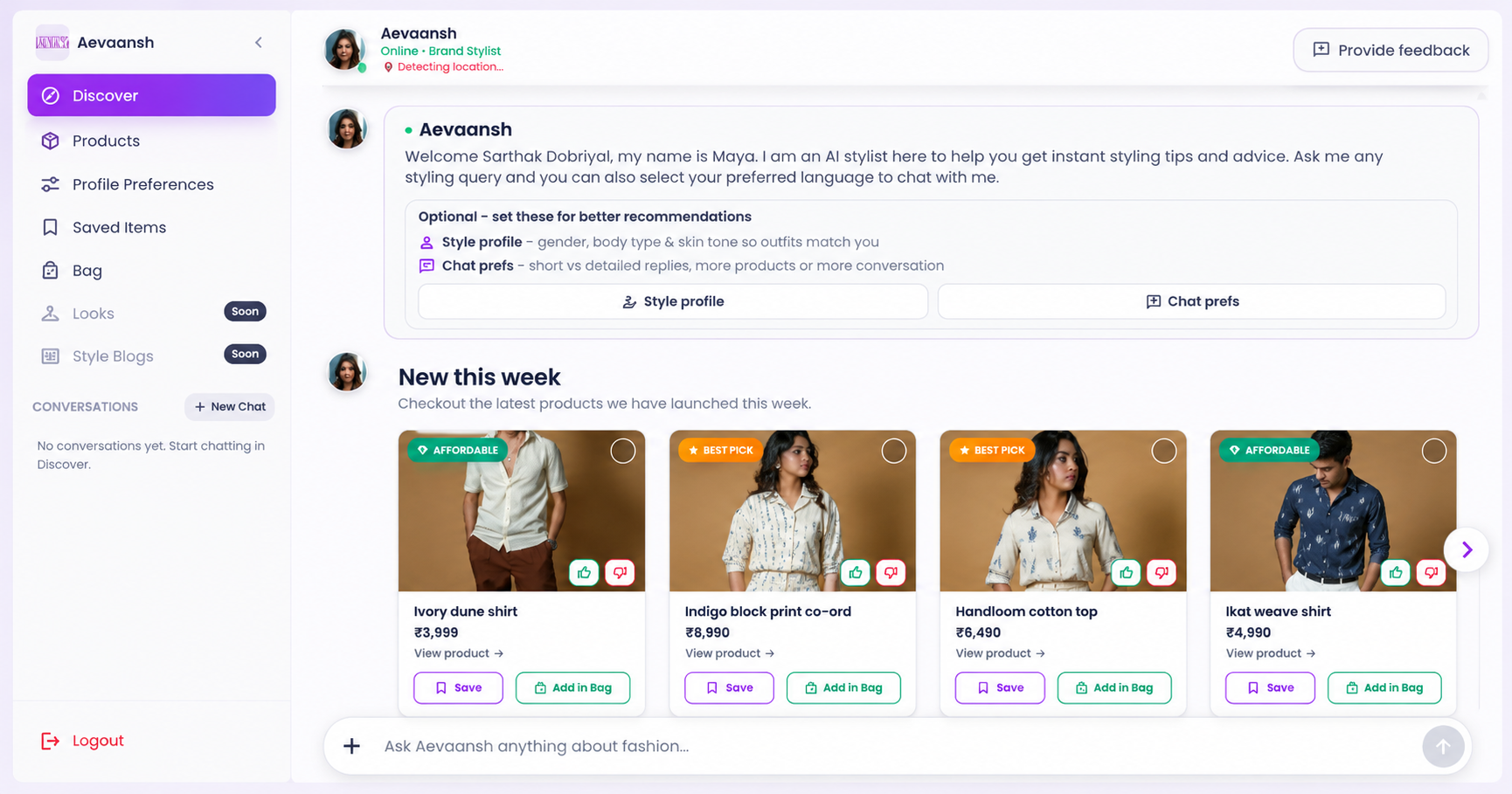
The storefront opens on Discover, where the brand's stylist greets you. It's shown with the brand's name and the label "Online · Brand Stylist". Type your question in the chat bar ("Ask [brand] anything about fashion"), for example:
- "What should I wear to a summer wedding?"
- "Something casual under ₹5,000"
- "Which shirt goes best with white trousers?"
The stylist answers with products from that brand, grouped by budget, with an Affordable tag on lower-priced picks. Discover also shows a New this week section with the brand's latest products.
Step 4: Set your preferences for better picks
Before you chat, tap Style profile and Chat prefs in the welcome message, or open Profile Preferences in the sidebar. You can set your gender, age group, favourite colours, favourite outfits, accessories, occasions (such as Casual Wear or Formal Wear), what matters most to you (such as Design and Colors) and your body type.
To start a fresh topic, tap New Chat. Your past chats with the brand appear under Conversations.
What Else Can I Do in a Brand's Storefront?
The sidebar of every brand storefront has a few more sections.
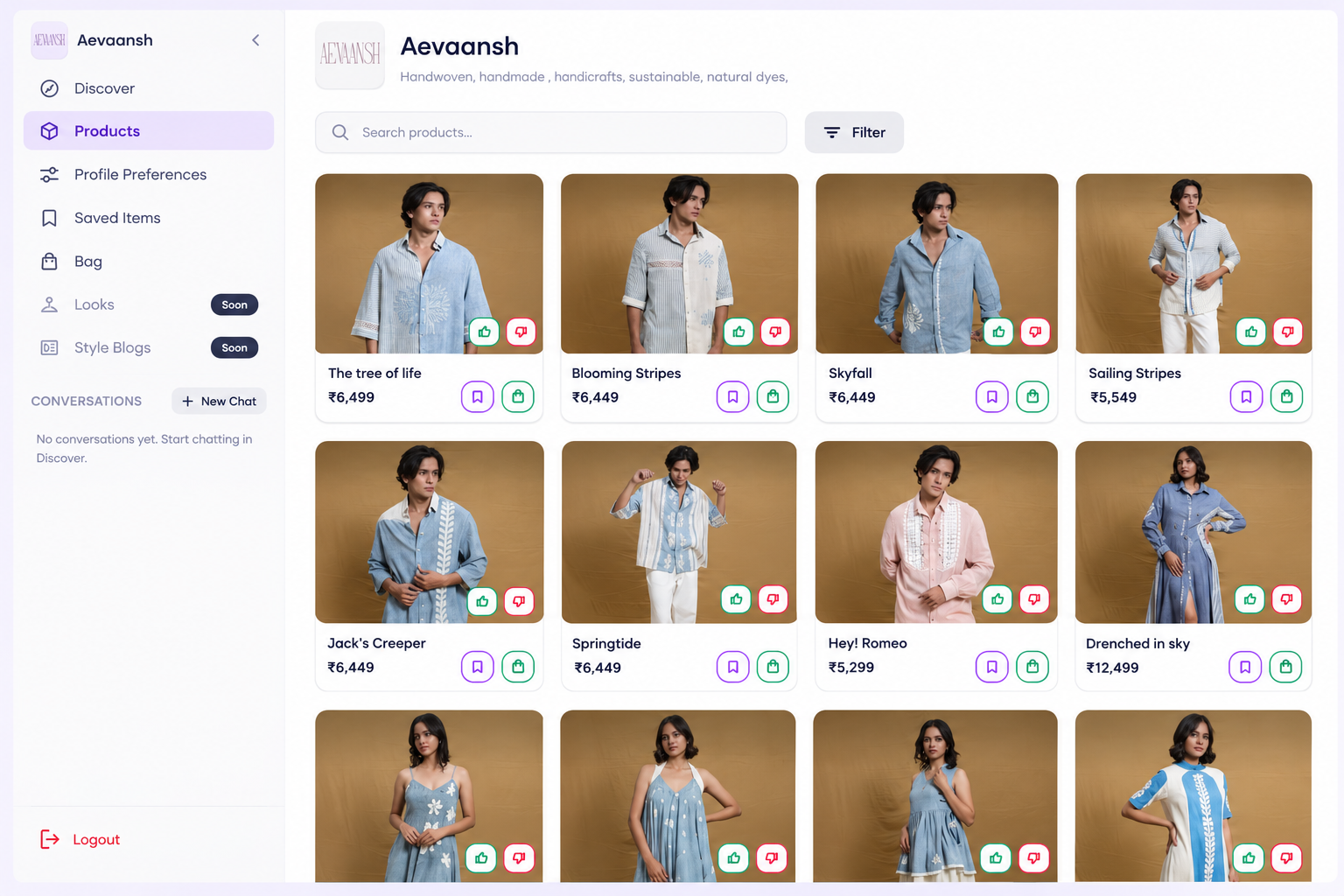
- Products: the brand's full catalog, with a short description of the brand at the top, a Search products bar and a Filter button. Each product card shows the name and price, with buttons to like, dislike, save, or add to your bag.
- Saved Items: the pieces you've saved, so you can come back to them.
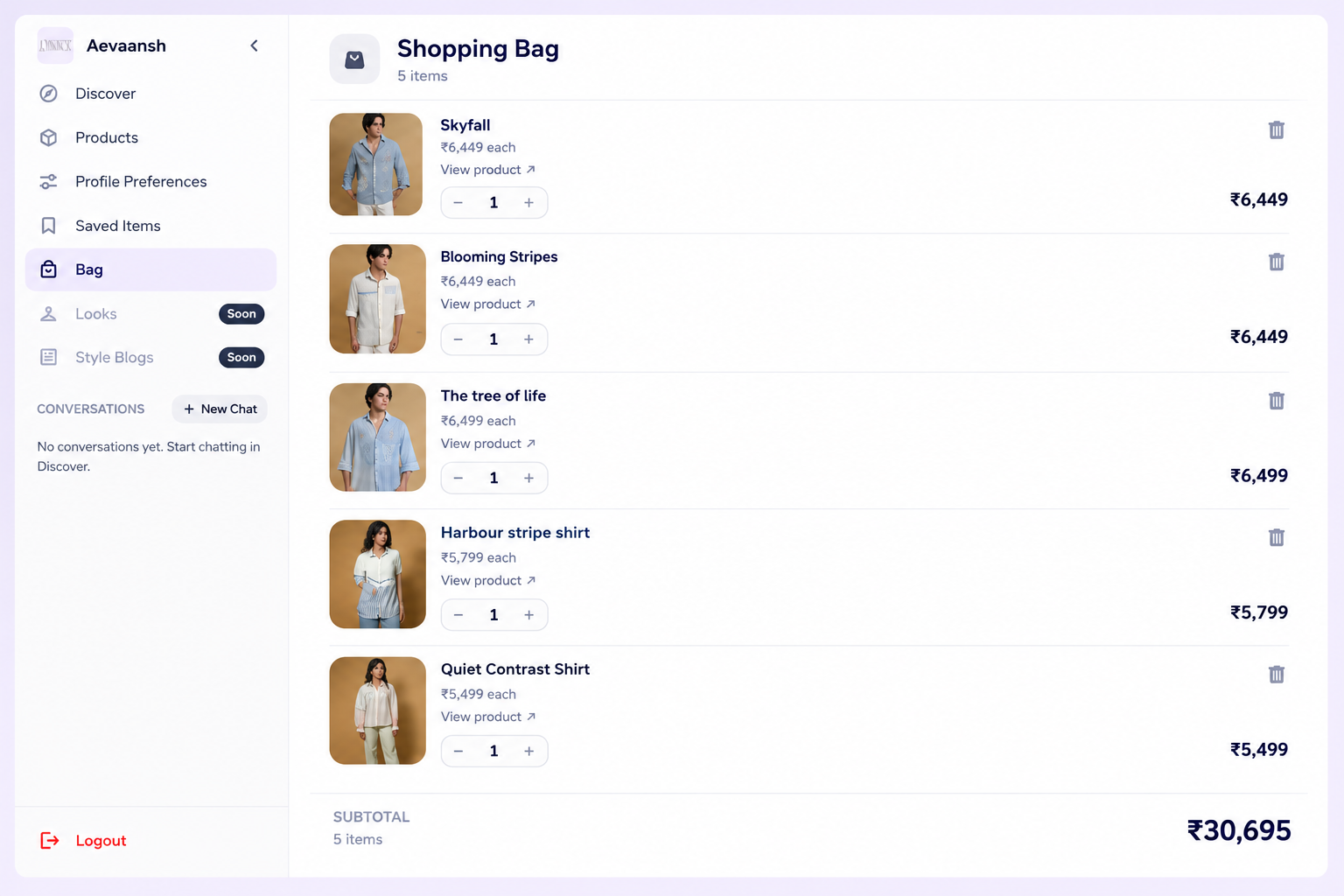
- Bag: a shopping bag for that brand, showing each item, its price, the quantity and a subtotal. Tap View product to open the item on the brand's site.
- Looks and Style Blogs: marked "Soon", so more is on the way.
What does a brand storefront look like?
Take Aevaansh, a label on StyleBuddy that describes itself as "handwoven, handmade, handicrafts, sustainable, natural dyes". Its storefront shows handwoven shirts such as The tree of life (₹6,499), Blooming Stripes (₹6,449), Skyfall (₹6,449) and Sailing Stripes (₹5,549). Ask its stylist, "What goes with Skyfall for a day wedding?" and it suggests pieces from the same collection. (Prices seen on 16 October 2026; they can change.)
Should I Use a Brand Stylist or Maya?
Both are AI stylists on StyleBuddy. The difference is how wide they look.
- Use a brand stylist when you already like a label and want help choosing from its collection: what to pair, which fit suits you, what's new this week.
- Use Maya, StyleBuddy's main AI stylist, when you want ideas from many brands at once, or you're not sure which label to shop. Maya searches across StyleBuddy's brands, and you can then open a brand's storefront for a closer look.
A good way to shop: ask Maya for ideas, find a brand you like, then chat with that brand's stylist to build the full look.
How Do I Buy From a Brand's Storefront?
Add the pieces you want to the Bag, check the quantities and subtotal, then tap View product to open each item on the brand's own website, where you choose your size and pay. Delivery and returns follow the brand's own policies.
Want to see the look on yourself first? The StyleBuddy app for Android and iOS lets you try looks on with virtual try-on.
Frequently Asked Questions
How do I chat with a brand's AI stylist on StyleBuddy?
On StyleBuddy, open Shop by Brand and tap any brand to open its storefront. The Discover tab shows the brand's own AI stylist, labelled Brand Stylist. Type a question such as "Something casual under ₹5,000" and it suggests products from that brand's catalog, grouped by budget.
What is a brand storefront on StyleBuddy?
A brand storefront on StyleBuddy is a brand's own page, such as stylebuddy.in/brands/aevaansh, with an AI stylist that knows only that brand's collection. It also has the brand's full product catalog, Saved Items, a Bag and your past conversations, so you can shop one label in one place.
What is the difference between a brand stylist and Maya?
On StyleBuddy, Maya is the main AI stylist and suggests products from many brands at once. A brand stylist works inside one brand's storefront and suggests products only from that brand. Use Maya to discover brands, and a brand stylist to choose from a label you already like.
Can a brand's AI stylist suggest outfits for my body type?
Yes, a brand's AI stylist on StyleBuddy uses your profile preferences. Open Profile Preferences in the storefront's sidebar, or tap Style profile in the welcome message, and set your gender, age group, favourite colours, outfits, accessories, occasions and body type for picks that suit you.
How do I buy from a brand storefront on StyleBuddy?
In a StyleBuddy brand storefront, add the pieces you like to the Bag, check the quantities and subtotal, then tap View product to open each item on the brand's own website. You choose your size and pay there, and the brand's delivery and return policies apply.
Find a Brand to Chat With
Open Shop by Brand and tap a label you like, or ask Maya to help you discover new ones first.
Read next: Where Can I Find Streetwear Brands in India? · How Does StyleBuddy Work?